Website | Getting Started | Documentation | Discord | Contributing
[ZML]: https://zml.ai/ [Getting Started]: #getting-started [Documentation]: https://docs.zml.ai [Contributing]: ./CONTRIBUTING.md [Discord]: https://discord.gg/6y72SN2E7H # Bonjour 👋 At ZML, we are creating exciting AI products on top of our high-performance AI inference stack. Our stack is built for production, using the amazing [Zig](https://ziglang.org) language, [MLIR](https://mlir.llvm.org), and the power of [Bazel](https://bazel.build).
Take me straight to getting started or give me a taste 🥐!
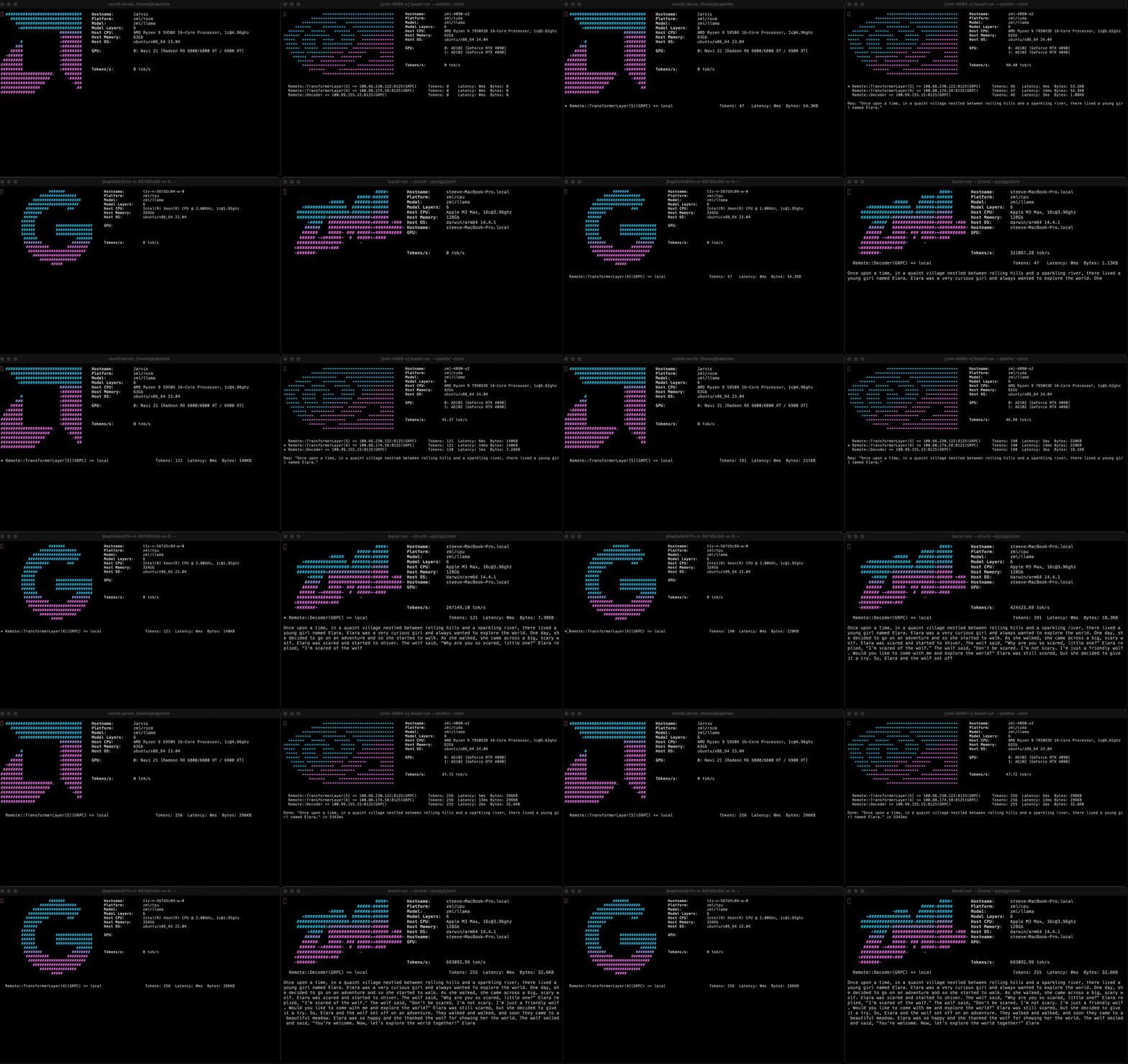
---   # We're happy to share! We're very happy to share our inference stack with the World and hope it allows you, too, to build cool and exciting AI projects. To give you a glimpse of what you can do with ZML, here is an early demo:
It shows a prototype running a LLama3 model sharded on 1 NVIDIA RTX 4090, 1 AMD 6800XT, and 1 Google Cloud TPU v2. All accelerators were hosted in different locations, with activations being passed over a VPN. All processes used the same model code, cross-compiled on a Mac, and copied onto the servers. For more inspiration, see also the examples below or check out the [examples](./examples) folder. # Getting started ## Prerequisites We use `bazel` to build ZML and its dependencies. The only prerequisite is `bazel`, which we recommend to download through `bazelisk`, a version manager for `bazel`. **Please note: If you do not wish to install `bazel`** system-wide, we provide [bazel.sh](bazel.sh) which downloads it to your home folder and runs it. **Install Bazel** (recommended):
### macOS ``` brew install bazelisk ```
### Linux ``` curl -L -o /usr/local/bin/bazel 'https://github.com/bazelbuild/bazelisk/releases/download/v1.25.0/bazelisk-linux-amd64' chmod +x /usr/local/bin/bazel ```
## Run a pre-packaged model We have implemented a variety of example models in ZML. See our reference implementations in the [examples](https://github.com/zml/zml/tree/master/examples/) folder. ### MNIST The [classic](https://en.wikipedia.org/wiki/MNIST_database) handwritten digits recognition task. The model is tasked to recognize a handwritten digit, which has been converted to a 28x28 pixel monochrome image. `Bazel` will download a pre-trained model, and the test dataset. The program will load the model, compile it, and classify a randomly picked example from the test dataset. On the command line: ``` bazel run --config=release //examples/mnist # or ./bazel.sh run --config=release //examples/mnist ``` ### Meta Llama 3.1 8B This model has restrictions, see [here](https://huggingface.co/meta-llama/Llama-3.1-8B-Instruct). It **requires approval from Meta on Huggingface**, which can take a few hours to get granted. Once you've been granted access, you're ready to download a gated model like `Llama-3.1-8B-Instruct`! First, you need to download the model using the [huggingface-cli](https://huggingface.co/docs/huggingface_hub/en/guides/cli). Note you don't need to install it yourself, you can just use the packaged version `bazel run //tools/hf --`. ``` bazel run //tools/hf -- download meta-llama/Llama-3.1-8B-Instruct --local-dir $HOME/Llama-3.1-8B-Instruct --exclude='*.pth' ``` Then, you can run the model. ``` bazel run --config=release //examples/llama -- --hf-model-path=$HOME/Llama-3.1-8B-Instruct bazel run --config=release //examples/llama -- --hf-model-path=$HOME/Llama-3.1-8B-Instruct --prompt="What is the capital of France?" ``` You can also try `Llama-3.1-70B-Instruct` if you have enough memory. ### Meta Llama 3.2 1B Like the 8B model above, this model also requires approval. See [here](https://huggingface.co/meta-llama/Llama-3.2-1B-Instruct) for access requirements. ``` bazel run //tools/hf -- download meta-llama/Llama-3.2-1B-Instruct --local-dir $HOME/Llama-3.2-1B-Instruct --exclude='*.pth' bazel run --config=release //examples/llama -- --hf-model-path=$HOME/Llama-3.2-1B-Instruct bazel run --config=release //examples/llama -- --hf-model-path=$HOME/Llama-3.2-1B-Instruct -- --prompt="What is the capital of France?" ``` For a larger 3.2 model, you can also try `Llama-3.2-3B-Instruct`. ## Running Models on GPU / TPU You can compile models for accelerator runtimes by appending one or more of the following arguments to the command line when compiling / running a model: - NVIDIA CUDA: `--@zml//runtimes:cuda=true` - AMD RoCM: `--@zml//runtimes:rocm=true` - Google TPU: `--@zml//runtimes:tpu=true` - AWS Trainium/Inferentia 2: `--@zml//runtimes:neuron=true` - **AVOID CPU:** `--@zml//runtimes:cpu=false` The latter, avoiding compilation for CPU, cuts down compilation time. So, to run the Llama 3.1 8B model from above on your host sporting an NVIDIA GPU, run the following: ``` bazel run --config=release //examples/llama \ --@zml//runtimes:cuda=true \ -- --hf-model-path=$HOME/Llama-3.1-8B-Instruct \ --prompt="What is the capital of France?" ``` ## Run Tests ``` bazel test //zml:test ``` # A taste of ZML ## MNIST ```zig const std = @import("std"); const zml = @import("zml"); /// Model definition const Mnist = struct { fc1: Layer, fc2: Layer, const Layer = struct { weight: zml.Tensor, bias: zml.Tensor, pub fn forward(self: Layer, input: zml.Tensor) zml.Tensor { return self.weight.matmul(input).add(self.bias).relu(); } }; /// just two linear layers + relu activation pub fn forward(self: Mnist, input: zml.Tensor) zml.Tensor { std.log.info("Compiling for target: {s}", .{@tagName(input.getContext().target())}); var x = input.flattenAll().convert(.f32); const layers: []const Layer = &.{ self.fc1, self.fc2 }; for (layers) |layer| { x = zml.call(layer, .forward, .{x}); } return x.argMax(0, .u8).indices; } }; ``` ## Tagged Tensors ```zig const Sdpa = struct { pub fn forward(_: Sdpa, ctx: *zml.Context, q_: zml.Tensor, k_: zml.Tensor, v_: zml.Tensor) zml.Tensor { const q = q_.withTags(.{ .b, .h, .q, .hd }); const k = k_.withTags(.{ .b, .h, .k, .hd }); const v = v_.withTags(.{ .b, .h, .k, .hd }); const attn_mask = zml.nn.causalAttnMask(ctx, .{ .q = q.dim(.q), .k = k.dim(.k) }, q.dtype(), null); return zml.nn.sdpa(ctx, q, k, v, .{ .attn_mask = attn_mask }); } }; ``` # Where to go next: You might want to check out more [examples](./examples), read through the [documentation directly on GitHub](./docs/README.md), or, for the full rendering experience, browse the [online documentation with included API reference](https://docs.zml.ai). # Contributing See [here][Contributing]. # License ZML is licensed under the [Apache 2.0 license](./LICENSE). # Thanks to our contributors