ImGui upside down with glClipControl(GL_UPPER_LEFT, ...) #3143

Closed
opened 2020-04-19 21:59:34 +00:00 by u3shit · 3 comments
u3shit commented 2020-04-19 21:59:34 +00:00 (Migrated from github.com)

Version/Branch of Dear ImGui:
Version: 1.76
Branch: v1.76 tag

Dear ImGui 1.76 (17600)
--------------------------------
sizeof(size_t): 8, sizeof(ImDrawIdx): 2, sizeof(ImDrawVert): 20
define: __cplusplus=201402
define: __linux__
define: __GNUC__=9
--------------------------------
io.BackendPlatformName: imgui_impl_glfw
io.BackendRendererName: imgui_impl_opengl3
io.ConfigFlags: 0x00000000
io.ConfigInputTextCursorBlink
io.ConfigWindowsResizeFromEdges
io.ConfigWindowsMemoryCompactTimer = 60.0f
io.BackendFlags: 0x0000000E
 HasMouseCursors
 HasSetMousePos
 RendererHasVtxOffset
--------------------------------
io.Fonts: 1 fonts, Flags: 0x00000000, TexSize: 512,64
io.DisplaySize: 1280.00,720.00
io.DisplayFramebufferScale: 1.00,1.00
--------------------------------
style.WindowPadding: 8.00,8.00
style.WindowBorderSize: 1.00
style.FramePadding: 4.00,3.00
style.FrameRounding: 0.00
style.FrameBorderSize: 0.00
style.ItemSpacing: 8.00,4.00
style.ItemInnerSpacing: 4.00,4.00

Back-end/Renderer/Compiler/OS

Back-ends: imgui_impl_glfw.cpp + imgui_impl_opengl3.cpp
Compiler: gcc
Operating System: Linux

My Issue/Question:
Paste the following line into the example_glfw_opengl3/main.cpp (or probably any other example using opengl3) just after the extension loader is initialized:
glClipControl(GL_UPPER_LEFT, GL_NEGATIVE_ONE_TO_ONE);
(I had to change the Makefile to use glew instead of gl3w as the bundled gl3w lacks this function).
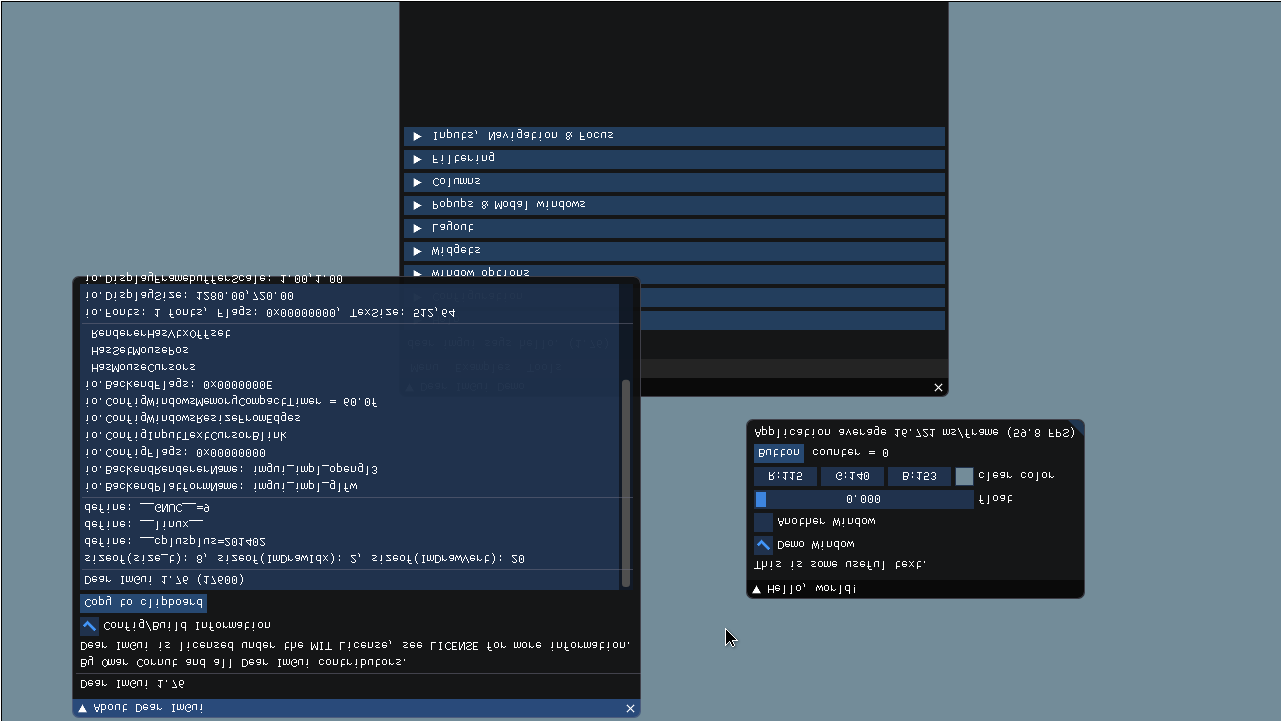
If I launch the example, the whole gui appears upside down, see the attached screenshot below.

In #2186 you fixed the glScissor in this case, but it only fixes the graphical glitches due to using wrong scissor coordinates, it doesn't do anything about the inverted y coordinate while drawing.
I see two ways to fix this:

  1. Also get CLIP_DEPTH_MODE, call glClipControl(GL_LOWER_LEFT, whatever); before rendering and glClipControl(GL_UPPER_LEFT, original_depth_mode); after. It's probably not the nicest solution, but more like a workaround that can be employed from the user code, like:
glClipControl(GL_LOWER_LEFT, GL_ZERO_TO_ONE);
ImGui_ImplOpenGL3_RenderDrawData(ImGui::GetDrawData());
glClipControl(GL_UPPER_LEFT, GL_ZERO_TO_ONE);
  1. When using GL_UPPER_LEFT origin, invert the y coordinate of the projection matrix (or in the shader) and only keep the inverted glScissor call (where clip_origin_lower_left == true in the current code). The reason behind this is that glClipControl changes how normalized device coordinates work, but not window space coordinates used by glViewport, glScissor and the likes. See issue 12 here: https://www.khronos.org/registry/OpenGL/extensions/ARB/ARB_clip_control.txt (and also issue 18 about frequent clip space changes, required by the first method).

Screenshots/Video
a

Standalone, minimal, complete and verifiable example:

// Just before IMGUI_CHECKVERSION();
glClipControl(GL_UPPER_LEFT, GL_NEGATIVE_ONE_TO_ONE);

You will need OpenGL 4.5 or the GL_ARB_clip_control extension

**Version/Branch of Dear ImGui:** Version: 1.76 Branch: v1.76 tag ``` Dear ImGui 1.76 (17600) -------------------------------- sizeof(size_t): 8, sizeof(ImDrawIdx): 2, sizeof(ImDrawVert): 20 define: __cplusplus=201402 define: __linux__ define: __GNUC__=9 -------------------------------- io.BackendPlatformName: imgui_impl_glfw io.BackendRendererName: imgui_impl_opengl3 io.ConfigFlags: 0x00000000 io.ConfigInputTextCursorBlink io.ConfigWindowsResizeFromEdges io.ConfigWindowsMemoryCompactTimer = 60.0f io.BackendFlags: 0x0000000E HasMouseCursors HasSetMousePos RendererHasVtxOffset -------------------------------- io.Fonts: 1 fonts, Flags: 0x00000000, TexSize: 512,64 io.DisplaySize: 1280.00,720.00 io.DisplayFramebufferScale: 1.00,1.00 -------------------------------- style.WindowPadding: 8.00,8.00 style.WindowBorderSize: 1.00 style.FramePadding: 4.00,3.00 style.FrameRounding: 0.00 style.FrameBorderSize: 0.00 style.ItemSpacing: 8.00,4.00 style.ItemInnerSpacing: 4.00,4.00 ``` **Back-end/Renderer/Compiler/OS** Back-ends: imgui_impl_glfw.cpp + imgui_impl_opengl3.cpp Compiler: gcc Operating System: Linux **My Issue/Question:** Paste the following line into the `example_glfw_opengl3/main.cpp` (or probably any other example using opengl3) just after the extension loader is initialized: `glClipControl(GL_UPPER_LEFT, GL_NEGATIVE_ONE_TO_ONE);` (I had to change the Makefile to use glew instead of gl3w as the bundled gl3w lacks this function). If I launch the example, the whole gui appears upside down, see the attached screenshot below. In #2186 you fixed the glScissor in this case, but it only fixes the graphical glitches due to using wrong scissor coordinates, it doesn't do anything about the inverted y coordinate while drawing. I see two ways to fix this: 1. Also get CLIP_DEPTH_MODE, call `glClipControl(GL_LOWER_LEFT, whatever);` before rendering and `glClipControl(GL_UPPER_LEFT, original_depth_mode);` after. It's probably not the nicest solution, but more like a workaround that can be employed from the user code, like: ```c++ glClipControl(GL_LOWER_LEFT, GL_ZERO_TO_ONE); ImGui_ImplOpenGL3_RenderDrawData(ImGui::GetDrawData()); glClipControl(GL_UPPER_LEFT, GL_ZERO_TO_ONE); ``` 2. When using GL_UPPER_LEFT origin, invert the y coordinate of the projection matrix (or in the shader) and only keep the inverted glScissor call (where `clip_origin_lower_left == true` in the current code). The reason behind this is that glClipControl changes how normalized device coordinates work, but not window space coordinates used by glViewport, glScissor and the likes. See issue 12 here: https://www.khronos.org/registry/OpenGL/extensions/ARB/ARB_clip_control.txt (and also issue 18 about frequent clip space changes, required by the first method). **Screenshots/Video** ![a](https://user-images.githubusercontent.com/17014489/79699719-756a7000-8291-11ea-8f81-044887c642b4.png) **Standalone, minimal, complete and verifiable example:** ```c++ // Just before IMGUI_CHECKVERSION(); glClipControl(GL_UPPER_LEFT, GL_NEGATIVE_ONE_TO_ONE); ``` You will need OpenGL 4.5 or the GL_ARB_clip_control extension
ocornut commented 2020-04-20 09:15:34 +00:00 (Migrated from github.com)

Hello,
Thanks for the report. I am a little bit confused about why #2186 seemingly passed if you suggest it is incomplete (please note I've only skimmed on this).
If not all loaders have the function it might be easier to adopt solution 2, would inverting T/B in ImGui_ImplOpenGL3_SetupRenderState() work? Could you submit a PR for it?
Thank you!

Hello, Thanks for the report. I am a little bit confused about why #2186 seemingly passed if you suggest it is incomplete (please note I've only skimmed on this). If not all loaders have the function it might be easier to adopt solution 2, would inverting T/B in `ImGui_ImplOpenGL3_SetupRenderState()` work? Could you submit a PR for it? Thank you!
u3shit commented 2020-04-20 10:09:04 +00:00 (Migrated from github.com)

Hello,
I'm not sure what is going on #2186, when I first tried imgui in my app I simply thought it has no support for glClipControl because everything was inverted vertically. I checked out f52f0a5 mentioned in #2186 and it's upside down there too.
I think I can make a PR (in a few days).

Hello, I'm not sure what is going on #2186, when I first tried imgui in my app I simply thought it has no support for glClipControl because everything was inverted vertically. I checked out f52f0a5 mentioned in #2186 and it's upside down there too. I think I can make a PR (in a few days).
ocornut commented 2020-04-22 08:12:30 +00:00 (Migrated from github.com)

Fixed by merged PR #3146, thank you!

Fixed by merged PR #3146, thank you!
Sign in to join this conversation.
No milestone
No assignees
1 participant
Notifications
Due date
The due date is invalid or out of range. Please use the format "yyyy-mm-dd".

No due date set.

Dependencies

No dependencies set.

Reference
ocornut/imgui#3143
No description provided.