
mirror of
https://github.com/ocornut/imgui.git
synced 2026-11-14 19:04:44 +00:00
Frame/Window padding issues with menus and buttons #6134
Labels
No labels
accidentally closed
android
backends
bug
building
clipper
coloredit
color spaces
cplusplus
data types
demo
disabled
doc
docking
dpi
drag drop
drawing/drawlist
dropped
dx12
enhancement
focus
font/text
gallery
help wanted
idle/power saving
ime
in progress
inputs
inputtext
internals
label/id and id stack
language bindings
layout
linux/bsd
menus
multi-contexts
multi-threading
multi-viewports
nav
news/info
opengl
optimization
osx/ios
overlap
plot/graph
popups
question
scrolling
selection
settings
sliders/drags
style
tables/columns
tabs
test wanted
tools
tooltips
tree
tricks & tips
useful widgets
vulkan
web
window pos/depth
window sizing
No milestone
No assignees
1 participant

Notifications
Due date
No due date set.
Dependencies
No dependencies set.
Reference
ocornut/imgui#6134
Loading…
Add table
Add a link
Reference in a new issue
No description provided.
Delete branch "%!s()"
Deleting a branch is permanent. Although the deleted branch may continue to exist for a short time before it actually gets removed, it CANNOT be undone in most cases. Continue?
Version/Branch of Dear ImGui:
Version: 1.89
Branch: docking (screenshot from docking but reproducible in master)
Back-end/Renderer/Compiler/OS
Back-ends: imgui_impl_opengl3.cpp + imgui_impl_glfw.cpp
Operating System: Windows 11
My Issue/Question:
I'd like to utilize the space to the right of the typical main menu by adding buttons. For this I want some padding for both the menu and the buttons. I might want other controls than buttons on this row so I am hoping that I don't have to use menu items only.
These are the issues:
Screenshots/Video
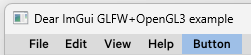
WindowPadding set to (20, 20):
FramePadding set to (20, 20):

FramePadding set to (10, 10):

Standalone, minimal, complete and verifiable example:
Skipping the rest of the menu items for saving space. Replace ImGuiStyleVar_WindowPadding with ImGuiStyleVar_FramePadding for testing the frame padding.
Hey @KarlHedlund, please try resetting this padding before drawing the buttons. I've had the same when changing the padding of my toolbar buttons.
See lines 237 and 240:
I tried it out and it did make the button visible. There were however some issues with the placement because I'm also using a Menu.
In your example I think it works because you are only using buttons and the insertion point is set using SetCursorPos. All buttons will then act the same. You are basically not using any frame padding for the button.
But when mixing with the Menu, it will not care about the removed frame_padding. I'm guessing it's a value that the MenuBar uses when positioning its menu children, but not buttons.
With a small bit of effort I think a workaround can be done with this though, since the blocking issue was that the button was hidden, thanks!